
Week: your weekly review
Week is your weekly review on one page: how the week went, what's worth a second look, what it taught you, and what you want next week to be about.
When to use it
Once a week, at the end of it. Weeks run Sunday to Saturday, so Saturday evening or Sunday works well. The page opens on the week that just finished (on a Sunday, that's the week that ended yesterday). Give it fifteen to thirty minutes.
How to use it
Read the week
- Open Week from the menu. The title shows the dates, and the arrows step to earlier weeks. The week you're in now is marked in progress.
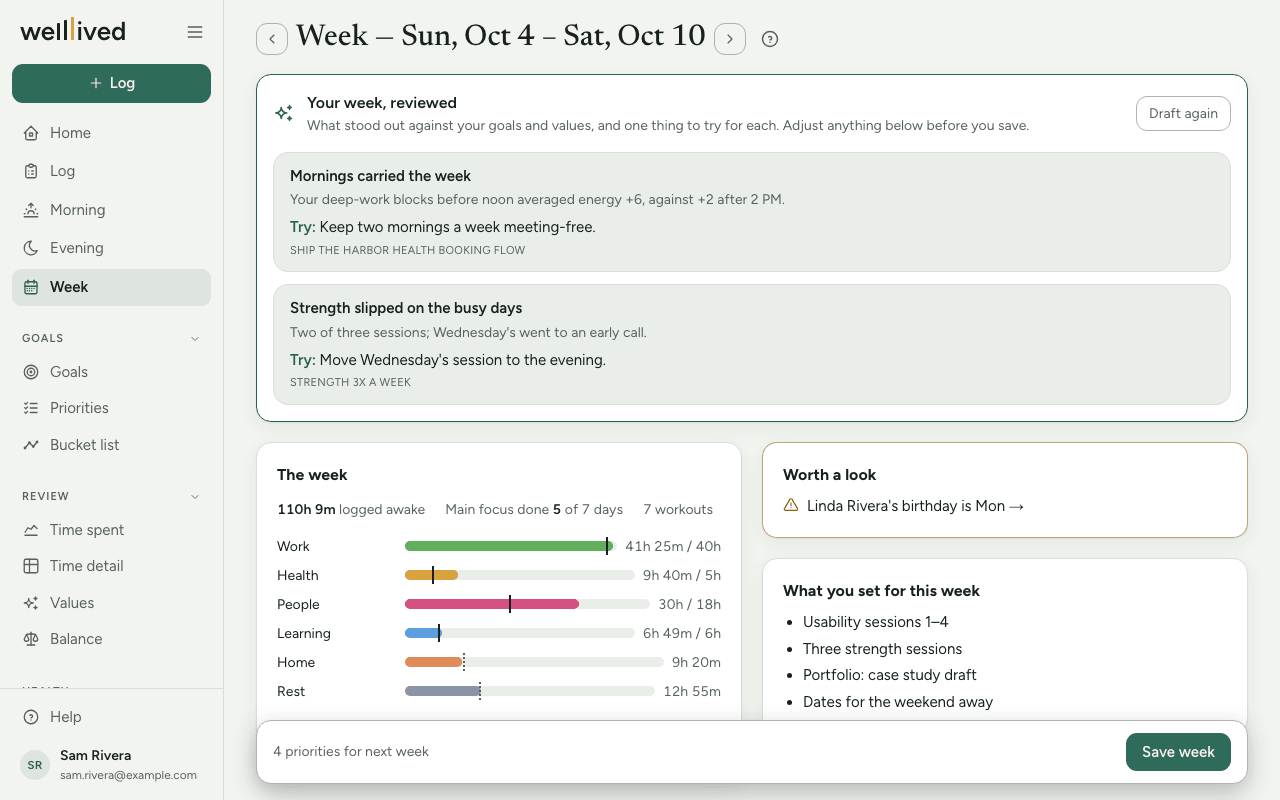
- The week shows the time you logged awake, how often your main focus from Morning got done, workouts if you track them, and a bar for each life area. A solid mark on a bar is the weekly target you set for that area; a dotted mark is your usual week (the average of the four before). Underneath, Lifted you and Drained you name the activities with the best and worst energy.
- Worth a look appears only when something is off: an area under 70% of its target, protein well under target, this month's priorities that haven't started late in the month, people due a check-in, or a birthday coming up. Each line links to where you'd deal with it.
- What you set for this week lists the priorities you chose in last week's review, so you can see how they went.
Confirm your values and balance
If you score values and balance on Evening, Values & balance this week shows the average of your nights for each one, with a small arrow for the change from the week before. If the week as a whole felt different from the nightly average, use − and + to set the week's score yourself; it gets a small asterisk, and reset puts it back to the average.
Below them, write a line or two under Most embodied and Lowest.
Write what the week taught you
Under This week taught me…, two or three sentences is enough. Open Your nightly takeaways underneath to see the one-line takeaways from each evening, which make a good starting point.
Set next week's priorities
Under Next week's priorities, add up to five. They'll sit beside your plan on Morning all week, so pick the ones you want in front of you each morning.
Update this month's priorities
If you use Priorities, This month's priorities lists them grouped by life area, each with a status you can change. Only the ones you change are saved.
Save
One Save week button, pinned to the bottom, saves everything on the page at once. The bar beside it says what the save will write, like "3 priorities for next week · 2 status changes".
Have the coach review your week
If the coach is on for your account, the top of the page offers Review my week. It uses AI to read the week against your goals and values and returns one to three things that stood out, each with the evidence, the goal or value it bears on, and one thing to Try:. It also drafts Most embodied, Lowest, This week taught me…, next week's priorities with a reason for each, and suggested status changes for this month's priorities. On the first draft, any text you've already written is left alone; suggested status changes are filled in and explained, so you can see what it proposes.
Read it, change what doesn't fit, then press Looks right — save week. You can ask for Draft again once a week. A second draft replaces the drafted text, so save or copy anything of your own first.
Tips
- Score your evenings during the week and this page mostly fills itself in. With no nightly scores, the values section has nothing to average.
- Keep next week's list short. Three priorities you look at every morning beat five you skim past.
- Set weekly hours for your life areas in Settings → Life areas and the bars get a target to measure against.
- You can review a week you skipped: step back with the arrow, fill it in and save. The coach drafts for this week and the three before it.
Questions
Why is the page showing last week, not this one? A review is about a finished week, so it opens on the one that just ended. Use the right arrow to look at the week in progress.
What's the difference between next week's priorities and Priorities? Next week's priorities are a short list for one week, shown on Morning. Priorities are monthly outcomes per life area. The week list is often the next step on a monthly one.
I changed a value's score for the week. Did I lose the nightly scores? No. Your nights stay as they were; the week just carries your own score instead of the average. Press reset to go back.
I don't see Review my week. It only shows when the coach is turned on for your account, and only for recent weeks. Everything else on the page works by hand.
Can I come back and change things after saving? Yes. Open the same week again, edit and press Save week.
Related: Morning, Evening, Priorities, Values, Balance, Your daily and weekly rhythm