
Evening: look back on the day and score it
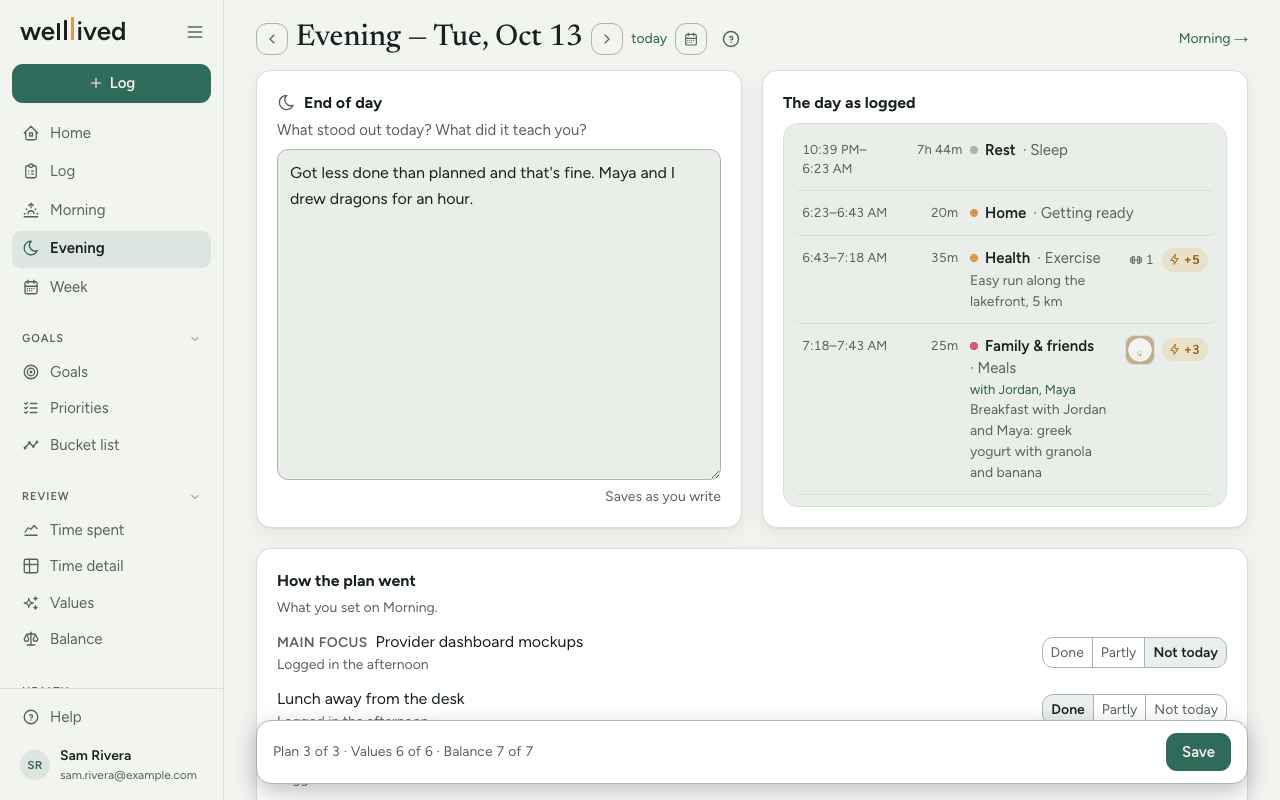
Evening is where you close the day: a few lines about what stood out, a quick check on how your plan went, and a score for each of your values and balance areas.
When to use it
At the end of the day, once the log is mostly caught up. Ten minutes is plenty. If you only get to it after midnight, the arrows at the top take you back to the day you're closing.
How to use it
1. Write what stood out
Under End of day, answer "What stood out today? What did it teach you?" A few lines is plenty. This box saves itself as you type, just like Morning.
Beside it, The day as logged shows your time log for the day, so you can jog your memory without switching pages.
2. Check how the plan went
If you set a plan on Morning, How the plan went lists your main focus and anything under Also today. Mark each one Done, Partly or Not today. If there was no plan, the page says so and points you to Morning.
3. Look at the day in numbers
Time & energy shows your awake time by project. The bar's length is the time; its colour is how it felt, from the energy you rated on your entries (amber lifted you, slate drained you, grey means nothing was rated). Time asleep is a single line underneath rather than a bar.
Mentioned, not tagged appears when your notes name someone in People, or a show or film, that isn't linked yet. Tap With (you spent the time with them) or About (the entry was about them), Add to Movies for a title, or Skip. If a first name fits more than one person, pick which one first.
4. Score your values and balance
Each value gets a score from 1 to 10. Away-from values (like a fear or a habit you're moving away from) score 10 when you were free of it today. Each balance area runs from −5 (too rested) through 0 (balanced) to +5 (burned out).
Use − and + to set a score, and tap + why under it to add a one-line reason. A score that sits 2 or more away from your recent normal gets a highlighted ring and a small note like "↑ from 6", so your eye goes to what moved.
5. Save
The plan check and the scores wait for you. The bar pinned to the bottom of the page shows what's left (for example "Plan 3 of 4 · Values 10 of 10") and holds the Save button. Nothing in these sections is stored until you press it.
Have the coach review your day
If the coach is on for your account, you'll see Have the coach review your day with a Review my day button. It uses AI to read your log, your morning journal and plan, and what you wrote under End of day, then drafts:
- a score and a one-line reason for each value and balance area,
- a guess at any plan item you haven't marked yourself,
- a one-line Takeaway for the day, which you can tap to edit,
- sometimes a short note on something it noticed, and a win or two,
- with Movies on, For your Movies: a show or film your log says you watched that isn't in Movies yet, something you said about one that isn't in its notes, or "a movie" with no title. Your words come prefilled; edit them and press Add to Movies (or Save to Movies) to add the title and file the note under Gained, or Skip.
Change anything that's off, then press Looks right — save (or Save once you've edited). The coach is shown your recent corrections the next time, so its drafts drift toward how you read your own days. You can ask for Draft again once a night, for instance after writing more in End of day.
Tips
- Write in End of day before you press Review my day. The coach reads it, and a sentence or two from you makes the scores much more yours.
- Your own marks on the plan always stand. The coach only fills in items you left unmarked.
- Entries in an intimacy activity are sent to the coach only as "Private", with no notes.
- Takeaways you save here are gathered on the Week page, under This week taught me…, so the weekly review starts from your own words.
- If you close the page with unsaved scores, the browser warns you. If anything slips through, the bottom bar offers Unsaved text from earlier with restore or discard.
Questions
I don't see the Review my day button. The coach only drafts for today or the two days before, and only when it's turned on for your account. Without it, the page works the same way by hand.
Can I score a night I missed last week? Yes. Use the arrows or the calendar button at the top to go to that day, set the scores and press Save. The coach won't draft that far back, but everything else works.
What does "too rested" mean for balance? That you had too little on in that area, so it's under-used rather than restful. Zero is the aim; both ends are worth noticing.
Where do my scores go? To your Values and Balance pages, where you can see them over weeks and months.
Do I need to use Morning for Evening to work? No. Without a plan you simply skip the plan check. Everything else on the page still works.
Related: Morning, Week, Values, Balance, Log, Your daily and weekly rhythm