
Balance: running too hot or too cold in each part of life
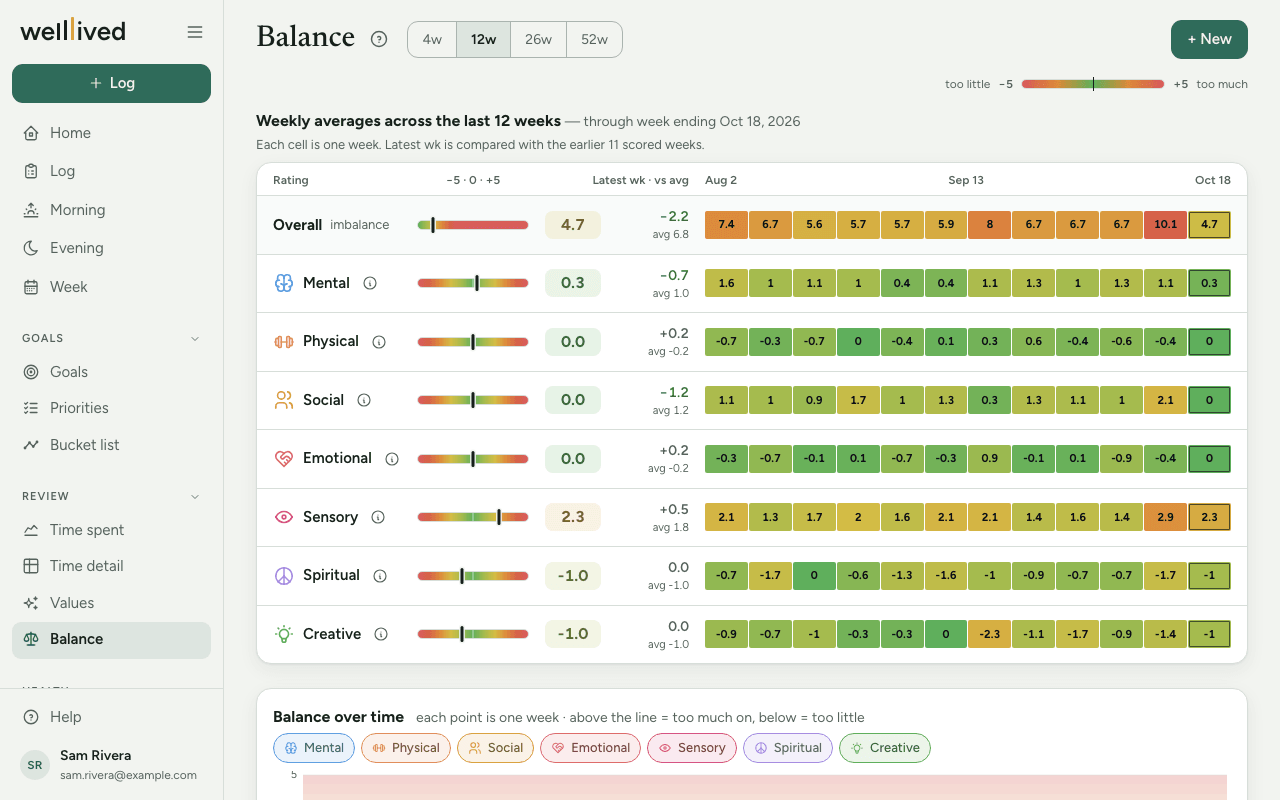
Balance tracks whether you're running too hot or too cold in the different parts of your life. Each area gets a score from −5 to +5 each night, and zero is the aim.
When to use it
Score on Evening at the end of each day. Look at this page every week or two, especially when you feel worn down or flat and want to see where it's coming from.
How the scale works
Each balance area runs from −5 to +5:
- −5 means too little on: under-used, under-stimulated, too rested.
- 0 means balanced.
- +5 means too much on: overloaded, heading for burnout.
So a day of back-to-back meetings might score Social +3, and a week alone at home might score Social −3. Both are worth noticing, which is why the colours deepen toward either end.
How to use it
Set up your areas
The first time, the page links to Settings → Balance.
- Pick a starter set and press Use this. The Seven kinds of rest set gives you Mental, Physical, Social, Emotional, Sensory, Spiritual and Creative, each of which can be over-used or under-used.
- Rename or add areas with + Add: a Name, Colour, Icon and an optional What it covers (for example "Screens, noise, stimulation").
- Drag to reorder. An area with scores can be archived but not deleted, so its history stays.
Score a night
On Evening, set each area with − and + and press Save. Or press + New on this page to score today, with a note under What felt out of balance today — and what restored it.
Read the page
- Pick a range: 4w, 12w, 26w or 52w.
- Each area has a small gauge from −5 to +5, its latest week's score, the change against your average, and a strip of coloured cells (one per week; at 4w, one per night).
- Overall adds up how far each area sits from zero. Lower is better, and zero means everything was balanced.
- Balance over time draws a line per area. Above the middle line is too much on, below is too little. Tap a chip to hide or show a line.
- History lists every night or week. Click a row to edit it.
Tips
- Score how the day felt, not how busy your calendar looked. A full day you enjoyed may still be a 0.
- Change arrows are coloured by distance from zero: moving toward 0 counts as better, whichever side you started on.
- A single +4 isn't a problem. Several weeks in a row on the same side is the thing to act on.
- Use the hints under each area while scoring; they say what the area covers.
- Over the week, the Week page shows each area's average and lets you set a different score for the week if the average doesn't feel right.
Questions
Is a negative score bad? Not more than a positive one. Negative means too little on in that area, positive means too much. Zero is the aim either way.
What does Overall mean? It adds up each area's distance from zero, ignoring the sign. With seven areas the worst possible is 35; the closer to 0, the more balanced the period.
How do I delete a night? Open it from History, clear every score and press Save.
Can I use my own areas instead of the starter set? Yes. Add, rename or archive them in Settings → Balance, and the page follows.
Related: Evening, Values, Week, Your daily and weekly rhythm