
Priorities: what each month should move forward
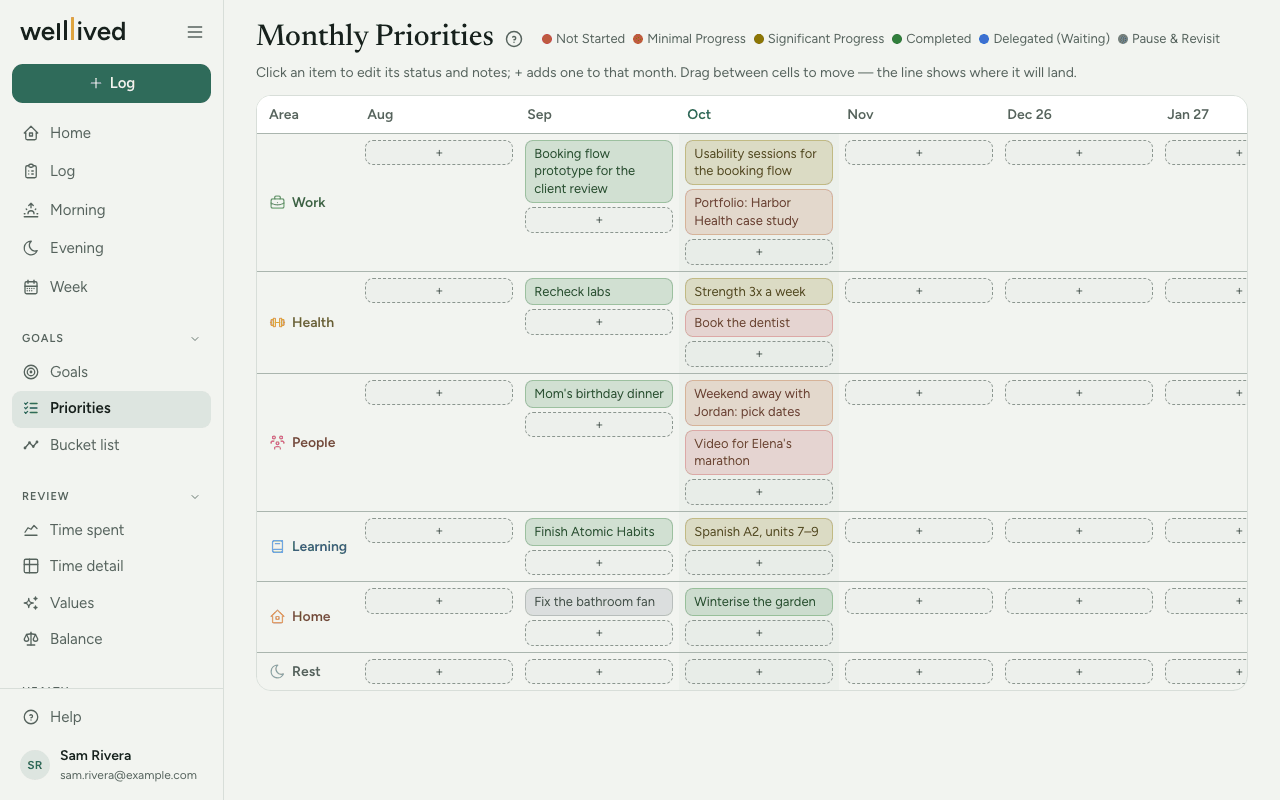
Priorities is a month-by-month grid of what you want to move forward in each area of your life. Each row is a life area, each column a month, and each item is one outcome you'd like that month to count for.
When to use it
At the start of each month, to choose what matters, and once a week to update where things stand. The Week page lets you update this month's statuses as part of your weekly review, so you may not need to open this page between months at all.
How to use it
Add a priority
- Open Priorities from the menu (under Goals). The current month's column is highlighted. The grid shows twelve months, starting two months back, and scrolls sideways.
- Find the row for the life area and press the + in this month's cell.
- Under What would make this month count?, write one thing you want to move forward in that area: an outcome, not a to-do. "Run three times a week" or "Launch the new website" work; "email Sam" belongs on today's plan.
- Optionally pick a Status and add Description / notes.
- Press Save.
Track progress
Click an item to change its Status. Each status has its own colour, and the legend at the top of the page (behind Legend on a phone) shows which is which:
- Not Started
- Minimal Progress
- Significant Progress
- Completed
- Delegated (Waiting), when it's in someone else's hands
- Pause & Revisit, when you've decided to set it aside for now
An item with no status shows plain, without a colour.
Move or carry over an item
Drag an item to another cell to move it to a different month or area. A line shows where it will land. At the start of a new month, drag anything still open into the new month's column to carry it over.
Delete an item
Open it, press Delete, then Really delete?.
Tips
- One or two items per area is plenty. If every row has five, nothing is a priority.
- Rows come from your life areas, in the order you set in Settings → Life areas. If you have no life areas yet, the page offers Set up life areas first.
- Hover over an item (on a computer) to see its notes without opening it.
- Use your quarterly Goals as the source. A good monthly priority is often the next step on one of them.
- Home shows this month's priorities with a small progress bar each, so you see them without opening this page.
Questions
Why do I see an area I haven't used? Every life area gets a row, even before it has a priority, so there's always a + to tap. Remove areas you don't want in Settings → Life areas.
Can I see months further back? The grid shows two months back and nine ahead. Older months are kept, they're just outside the grid.
What's the difference between this and Week's priorities? Priorities here are monthly and belong to a life area. The priorities you set on Week are a short list for the coming week, shown on Morning each day.
Does the weekly review change these? Only if you ask it to. On the Week page you can change this month's statuses, and if you use the coach it may suggest changes. Nothing is saved until you press Save week.
Related: Goals, Week, Home, Projects, activities and life areas