
Morning: write, then plan your day
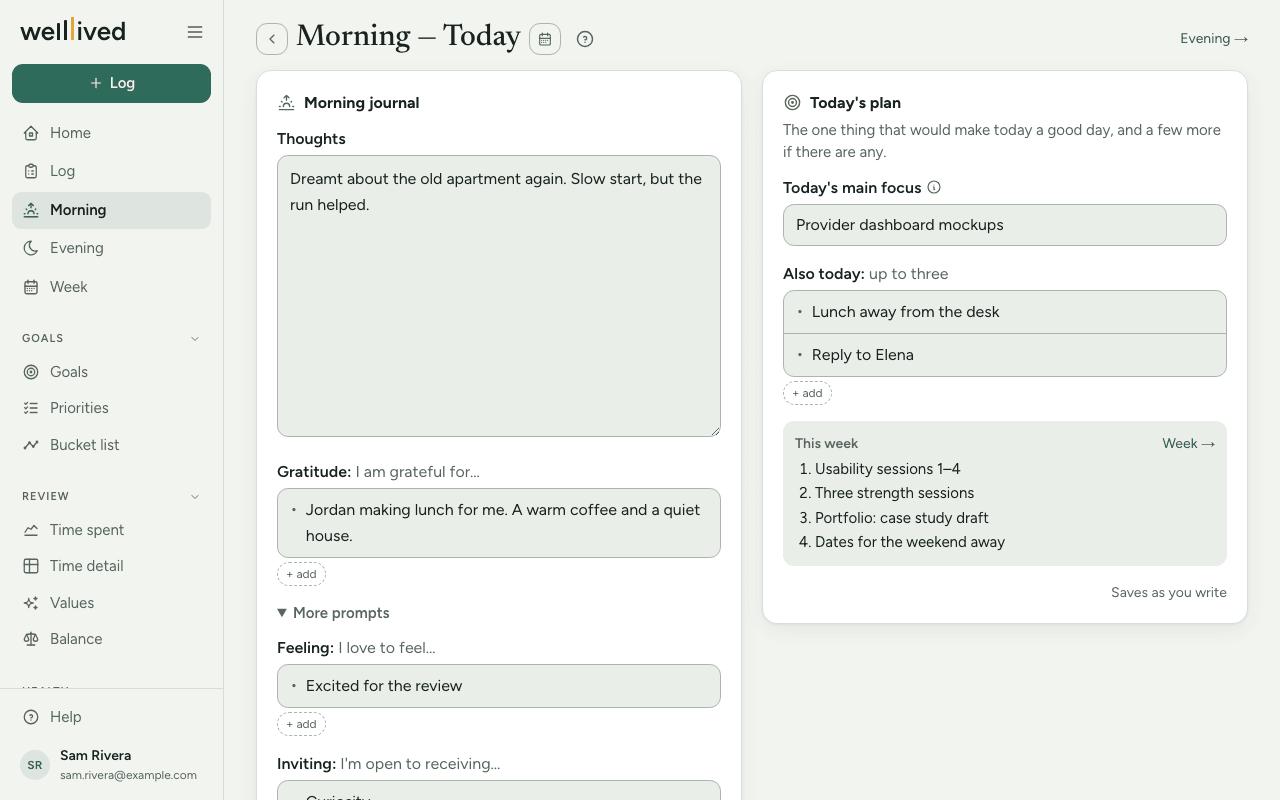
Morning is a short page for the start of your day: a few minutes of writing in your Morning journal, then a plan for the day in one or a handful of lines.
When to use it
First thing, before the day gets loud. It takes five to fifteen minutes, and what you write here comes back to you on Evening, where you check how the plan went.
How to use it
Write your morning journal
- Open Morning from the menu (on a phone it's one of the tabs at the bottom).
- Under Thoughts, write whatever is on your mind. There's no wrong length.
- Under Gratitude ("I am grateful for…"), add a few things, one per line. Press Enter for a new bullet; Backspace on an empty bullet removes it.
- If you want more prompts, open More prompts. You'll find Feeling ("I love to feel…") and Inviting ("I'm open to receiving…"). If you've used either in the last month, they open on their own.
Set today's plan
- In Today's main focus, write the one thing that would make today a good day. An outcome works better than a vague intention: "Finish the draft of the proposal" beats "work on proposal".
- Under Also today, add up to three more things if there are any. Leaving it empty is fine.
- If you set priorities for the week on the Week page, they show in a This week box beside your plan, so you can pick today's focus with them in view.
There's no Save button. Everything on Morning saves itself as you type, and the line at the bottom of the plan card says Saving… and then Saved with the time.
Look back at earlier mornings
Past entries at the bottom of the page lists the mornings you've written, with a preview of each. Click one to open it. You can also use the arrows beside the date, or the calendar button, to step to another day.
Tips
- Keep the main focus to one thing. It's what you'll be asked about on Evening, and it's what Home and the Log page show at the top of the day.
- If you change a plan item's wording during the day, the item keeps any status you already gave it, as long as the title stays the same.
- If you write something in Also today but leave the main focus empty, the first item is treated as the main focus.
- Short entries count. Two lines of thoughts and one thing you're grateful for is a perfectly good morning.
- On a phone, the Morning tab at the bottom turns into Evening from 3 PM, so the page you need is the one you see.
- Evening → in the top right jumps to the same day's Evening page.
Questions
Do I have to fill in every section? No. Write in whichever boxes help. A day with only a main focus, or only a journal, saves just fine.
Where does my plan show up later? Your main focus appears at the top of Home and above the timeline on the Log page. On Evening, each plan item gets a quick Done, Partly or Not today.
Can I change the plan after lunch? Yes. Come back to Morning and edit it. Items whose wording you keep hold on to any status you've already marked.
Is my journal private? It's stored with the rest of your data in your account and isn't shared with anyone. If you ask the coach on Evening to review your day, it reads that morning's journal and plan along with your log and reflection, so its scores can take them into account. Nothing is sent until you press the button.
What happened to the old "Doing" list on older entries? If you have mornings written before the plan existed, their list shows read-only under Doing — written that morning.
Related: Evening, Week, Home, Log, Your daily and weekly rhythm