
Values: how closely you're living by what matters
Values shows how closely you lived by what matters to you, night by night and week by week. You score each of your values at the end of the day, and this page turns those scores into trends you can read.
When to use it
You'll usually score on Evening. Come to this page once a week or so to see the pattern, and when you want to write what the week is teaching you.
How to use it
Set up your values
The first time, the page asks you to set them up and links to Settings → Values.
- Pick a starter set and press Use this. You can rename, reword, recolour, add or archive any value afterwards.
- To add your own, press + Add and fill in:
- Name, Colour and Icon;
- Kind: Toward (score how much you lived it) or Away-from (score 10 when you were free of it). Away-from suits things like a fear or an old pattern you're working your way out of;
- What counts, a short description of what living it looks like;
- My commitment (optional), a longer note shown behind Read my commitment when you score.
- Drag values to change their order.
A value that already has scores can't be deleted, only archived, so its history stays.
Score a night
On Evening, score each value from 1 to 10 and press Save. You can also press + New on this page to score today: enter a number for each value, write a line under What today taught me if you like, and press Save. The scale is 1–3 poor, 4–6 ok, 7–8 good, 9–10 outstanding.
Read the page
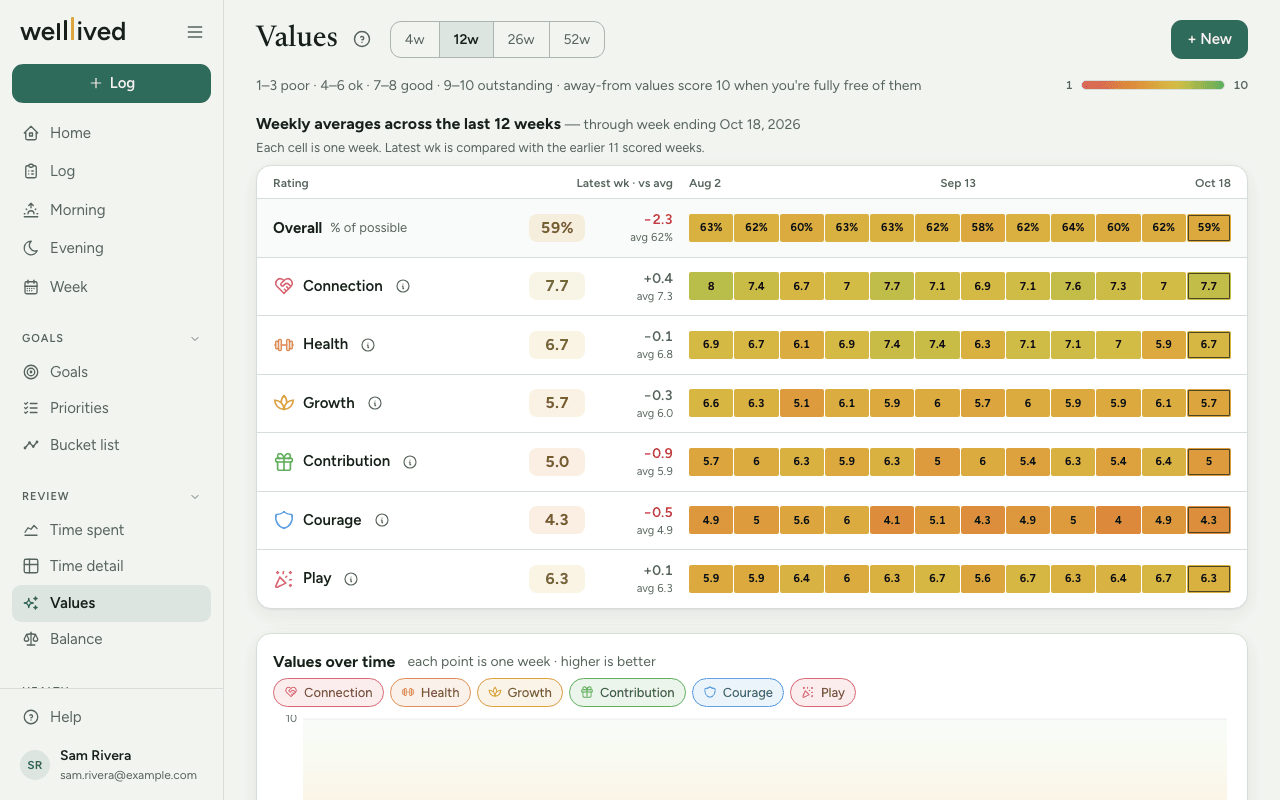
- Pick a range at the top: 4w, 12w, 26w or 52w.
- The summary shows one row per value. Each has its latest week's score, the change against your average over the range, and a strip of coloured cells (one per week; at 4w, one per night). Hover over a cell to see the exact score. Overall at the top is your total as a percentage of the most you could score.
- Values over time draws a line per value. Tap a value's chip to hide or show its line. If you have away-from values, Toward and Away-from switch between the two groups, since they mean opposite things.
- This week is teaching me… is your weekly reflection. Press Write it (or Edit) to add it, along with your most embodied and lowest rated value. Open What each night said for the week's nightly notes.
- History lists every night (Daily) or week (Weekly). Click a row to edit it.
Tips
- The ⓘ next to a value shows its description, so you can check what you meant by it while you score.
- In the Weekly history, a number with a dotted underline is the average of your nights. A plain number is a weekly score you set yourself.
- Setting a score in a week's editor replaces the average for that week. To go back, clear it.
- Change the wording of a value whenever it stops fitting. The scores stay attached to it.
- Scores are for you. A 5 isn't a failure; it's something to notice.
Questions
What's the difference between toward and away-from values? A toward value is something you want more of, so 10 means you lived it fully. An away-from value is something you're moving away from, so 10 means you were completely free of it today. Both use the same 1–10 scale.
How do I delete a night's scores? Open the night from History, clear every score and press Save. Clearing every score deletes the entry.
Why does the summary report on an older week? It reports on the newest week that has scores. Early in a new week, before you've scored anything, that's the week before.
How do I score a night I missed? Go to that day on Evening with the arrows or calendar button, score it and save.
Related: Evening, Balance, Week, Your daily and weekly rhythm