
People: keep in touch with the people you care about
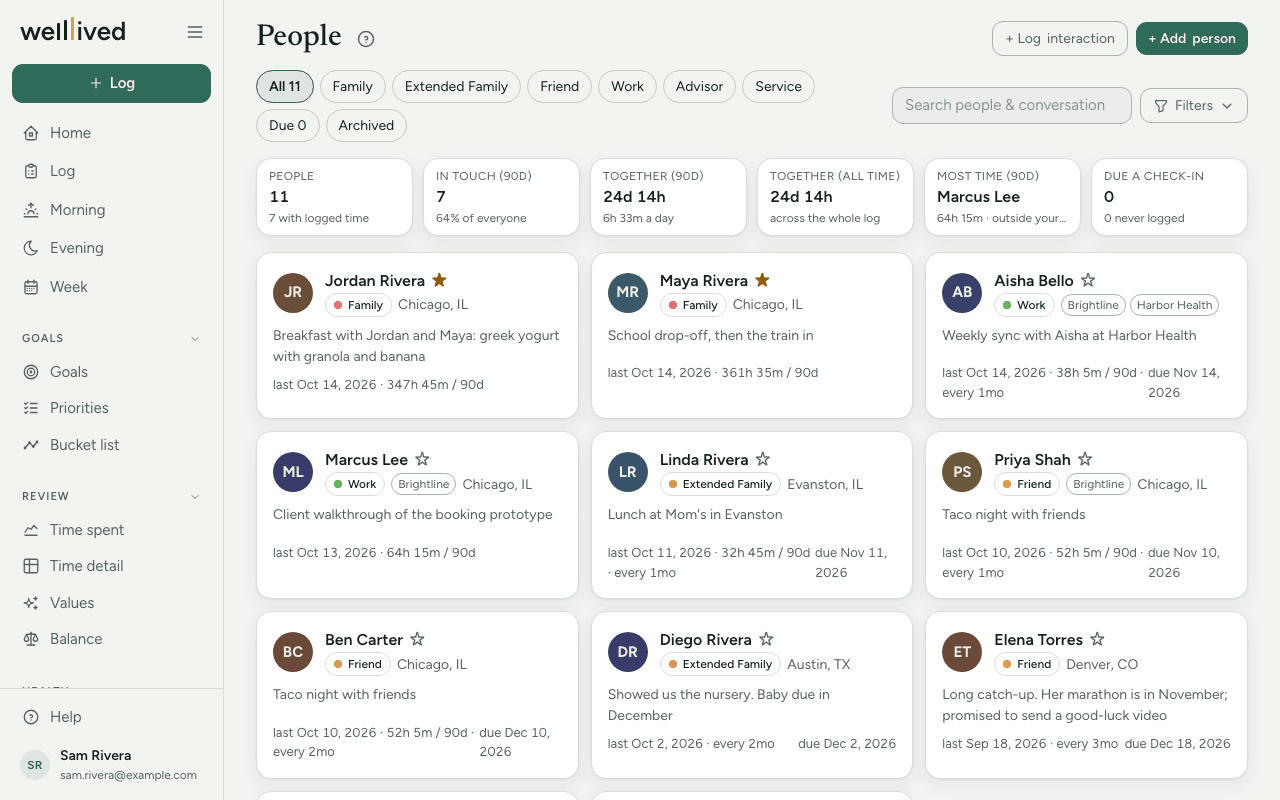
People is a gentle address book for the relationships you care about. It adds up the time you've spent with each person from your log, keeps a record of messages and calls, and tells you who you're due to get back in touch with.
When to use it
Glance at the Due list once a week, perhaps during your weekly review, and pick one or two people to reach out to. Open a person's page before you see them, to remember what you talked about last time.
How to use it
Add the people who matter
- Open People from the Life group in the menu.
- Press + Add person.
- Fill in a first name, and as much else as you like: Type (Family, Friend, Work and so on), ★ Most important, Tags, Location, Notes.
- Set Check in to how often you'd like to be in touch: Monthly, Every 2 mo, Quarterly, Every 6 mo or Yearly. Leave it at None if you don't want reminders.
Record time together
Time together comes from the Log. When you log an entry, add the person in the With field. If your notes mention someone you've added, the Log offers their name as a chip to tap; nothing is added until you tap it.
Each name in With has a small switch between with and about. Use about when the entry concerned someone who wasn't there (writing them a reference, say). It's recorded on their page but doesn't count as time together.
Record a message or a call
For contact that isn't time together (an email, a WhatsApp thread, a phone call), press + Log interaction. Choose the person, the Date, the Platform, who it was Initiated by, and a short Summary. Logging an interaction counts as being in touch, so it resets their check-in date.
See who's due
The chips along the top filter the list: All, one chip for each type of relationship, Due (people past their check-in date) and Archived. The tiles above the cards show how many people you've been in touch with in the last 90 days, how much time you've spent together, and how many are due.
Under Filters you can filter by Tag, change the Sort (last contact, next due, name, time together) and switch between Cards and Table.
A person's page
Click anyone to open their page. You'll find:
- Their details, with Edit to change them or add a photo, birthday, contact details, nicknames and how you met.
- Tiles for Time together, Last 90 days, Entries and when you met.
- Keep in touch: when your next check-in is due, with + Log interaction and Draft a check-in.
- A timeline of everything you've logged with them, newest first. Switch between With, About and All, and search the notes with Search these notes….
Draft a check-in
Draft a check-in uses AI to write a short text and an email from your history together (your recent interactions and the notes on your time together). If the person has a website on their card, it reads that too.
- Press Draft a check-in and choose Text or Email.
- Edit the words until they sound like you.
- Send it yourself: Copy, or WhatsApp, SMS or Open in mail when you've saved their phone or email. The app never sends anything for you.
- Once you've sent it, pick the channel from ✓ Reached out via…. That logs the interaction and resets their check-in date.
Tips
- Add nicknames on a person's card (Edit). The Log uses them to recognise who your notes are talking about.
- Star the handful of people who matter most. They sit first in every list.
- In Settings → People you can rename, recolour and reorder relationship types, and mark one as your Household. Starred people of that type can be added together with one tap on books and movies, and a note that mentions your family suggests them on the Log.
- Also in Settings → People: Ignore these names stops company and tool names from being offered as people, and Household words lists the words that mean "the whole household" in your notes.
- Archive rather than delete. Archive is at the bottom of a person's editor, and Restore brings them back.
Questions
Why does someone show as due when I saw them last week? The check-in date counts from the latest time you logged with them, or the latest interaction. If that visit isn't in the Log with their name in With, the app doesn't know about it. Add them to the entry, or log an interaction.
Does the app ever add people to my entries on its own? No. Names it finds in your notes are offered as chips, and only the ones you tap are saved.
Will a check-in draft be sent automatically? Never. You copy it or open it in your own messaging or mail app, and send it yourself.
Can I delete a person? People are archived, not deleted, so your history together stays intact. An archived person disappears from the lists and the Log's suggestions, and Restore brings them back.
What's the difference between "With" and "About"? With means they were there, and it counts toward time together. About means the entry concerned them, and it only appears on their page under About.