
Dreams: your dream journal
Dreams is a dream journal. Write a dream down, and if you'd like, ask for a reading of it. Over time the page shows which symbols, themes, people and feelings keep coming back.
When to use it
First thing in the morning, before the dream fades. Even a fragment is worth writing. The reading can wait until later in the day, or until you've had time to think about the questions it asks.
How to use it
Write a dream down
- Open Dreams from the Life group in the menu.
- Press + New dream.
- Write it under The dream, as it comes. Fragments are fine.
- Check the Wake date (the morning you woke up), and add what you like:
- What's going on: anything from the last few days the dream might be touching.
- Vividness and Emotional charge, from 1 to 5.
- Lucid, if you knew you were dreaming.
- Importance, in stars: how much this dream is worth coming back to.
- Who appeared, chosen from your People.
- Save. The dream's own page opens.
Get a reading
On the dream's page, under Read this dream, you have two choices. Both use AI.
- Go deeper — ask me first asks you four to seven questions about the dream: what a symbol brings to mind, how a moment felt. Answer any of them and skip the rest, then press Interpret from my answers. Save answers for later keeps what you've written so you can come back.
- Quick read interprets straight from the dream and your logs. It notes what it assumed without asking.
A reading looks at the dream through a Jungian lens, the psychology of Carl Jung, and also draws on what was going on in your waking life: your log from the day before, your morning journal and your values notes. You'll see that context on the right of the dream's page, under Waking life, so you know what the reading used.
A reading ends with A question to carry and a few Integration practices. It also gives the dream a title if you didn't, and picks out its symbols, themes and feelings.
People in your dreams
People are never linked to a dream automatically. If a reading spots someone you know, their name appears as a chip under Who appeared; tap it to link them. Linked dreams show on that person's page under Dreams.
See the patterns
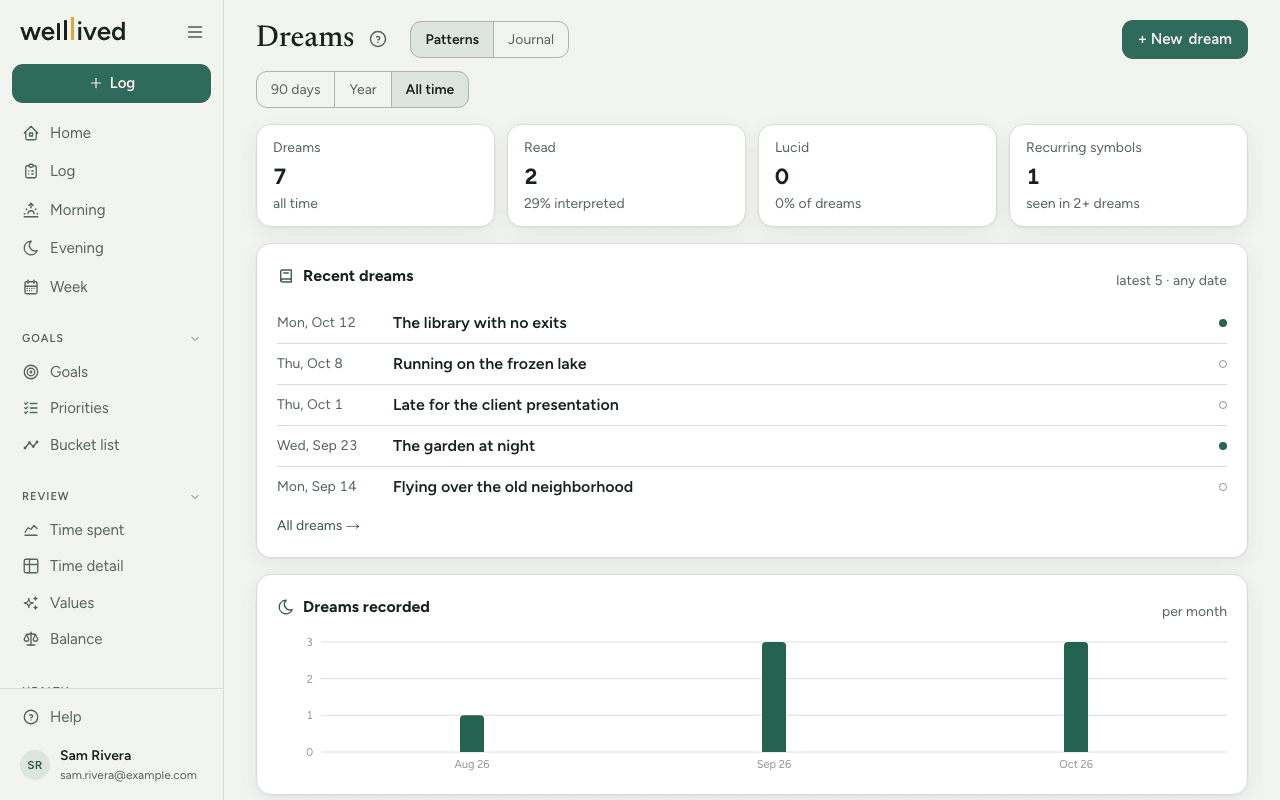
The Patterns view (the default) shows how many dreams you've recorded and read, how many were lucid, and what recurs: Recurring symbols, Themes, Who appears and Feelings. Tap a symbol to see every dream it appeared in. Use 90 days, Year or All time to change the window.
The Journal view lists every dream in a table you can search and sort, with Charge, Importance and whether it has been read. Filters narrows it by year, lucid or unread dreams, and minimum importance.
Tips
- Write in the present tense ("I'm walking down a corridor…"). It keeps the dream vivid.
- The questions are worth the extra minute. A reading is only as good as the associations behind it, and your answers are what it works from.
- Symbols only appear once a dream has been read. A dream you've only written down won't show up in the patterns yet.
- Come back days later and add a Reflection: what landed, what didn't, what happened next.
- Read again (under the reading) replaces the reading with a new one. Your answers and reflection stay.
Questions
Do I have to get a reading? No. Many people just keep the journal. You can read any dream later.
Why did my reading take a while? A full reading takes a minute or so. The page refreshes when it's ready.
Can I edit a dream after it's been read? Yes. Press Edit dream. If you change the dream a lot, use Read again for a fresh reading.
How do I delete a dream? Press Edit dream, then Delete and Really delete?.
Why are some dreams marked with an empty dot? That dream hasn't been read yet. A filled dot means it has.