
Workouts: your sessions, sets and progress
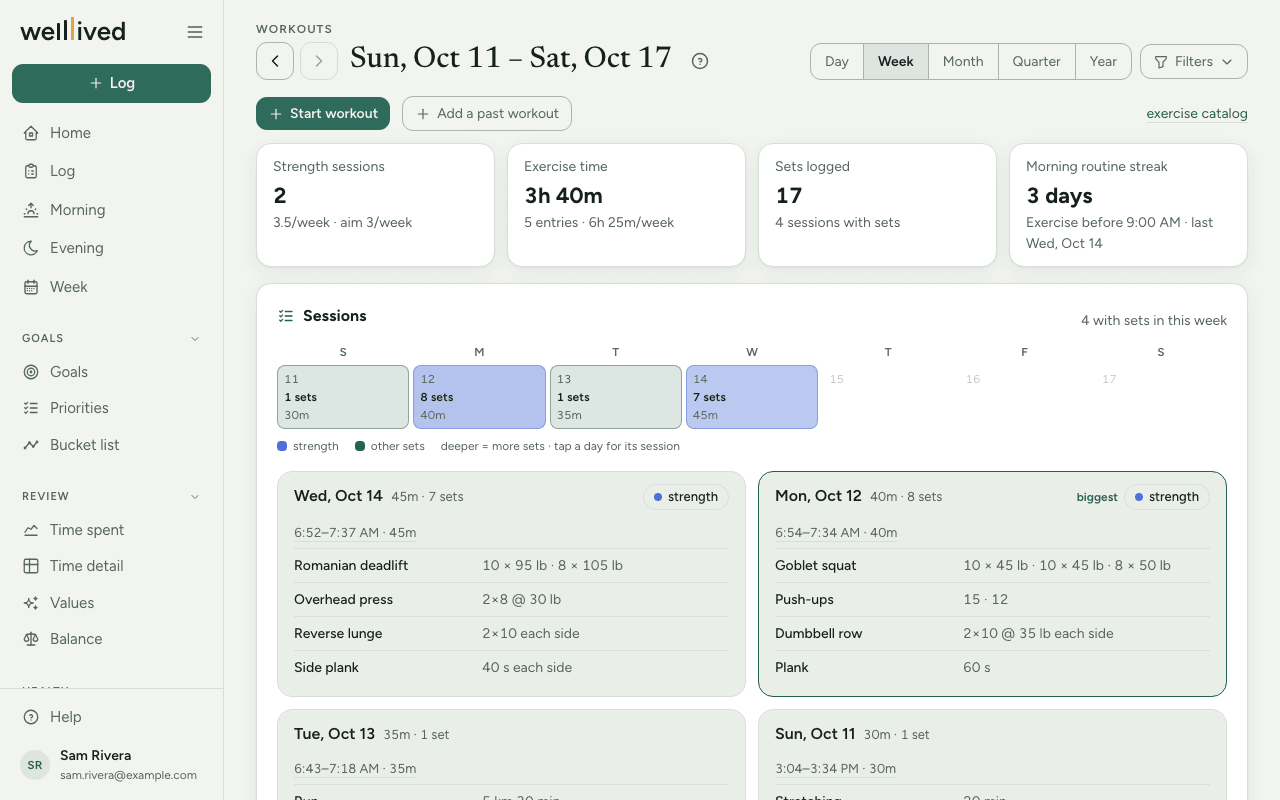
Workouts shows the exercise you've logged: each session's sets and reps, how often you do strength work, your morning routine streak, and how your best sets are moving over time.
When to use it
The logging happens on the Log page, right after you train. Come here once a week to see whether you're hitting your strength sessions and whether the numbers are going up.
How to use it
Log a workout
Sets are logged on an ordinary time entry, so there's no separate workout form.
- Log the time you spent exercising as usual, with an activity that has the Workouts role. New accounts start with one called Exercise.
- In the notes, write what you did in plain words, for example
pushups 15 15 12, squats 3x8 @ 135, plank 60 sec. - As you type, each exercise it recognises appears as a dashed chip under the notes, such as + pushups · 15, 15, 12? Tap a chip to keep it; it turns solid with a check mark.
- To fix a count, tap the pencil on a kept chip. You can change reps, weight and seconds per set, add + set like the last, tick each side, switch between lb and kg, or Remove exercise. Tap Done when finished.
- Save the entry. The sets are saved with it.
Ways to write sets
-
pushups 15 15 12: one set per number. -
bench 3x12 @ 40: three sets of twelve at 40. The smaller number is always taken as the number of sets. -
curls 3 sets of 12: said out loud. -
lat pulldown 90 lb x 10 x 3: a weight first, then reps, then sets. -
20 min yogaorplank 60 sec: timed. -
bird dogs 2x10 each side: per side. -
squats 3x8 @ 135 rpe 8: adds how hard it felt. -
stretching, walk: a name on its own just means you did it.
Separate exercises with commas, semicolons, "and" or new lines. A bare weight uses the unit in Settings → Profile.
Repeat a routine
If you do much the same thing each time, a Repeat chip shows your last workout with sets (for example Repeat Mon, Oct 12: pushups, squats). Tap it to keep the same exercises and sets, then edit anything that differed. If the notes are empty, it fills them in for you.
Read the page
- Choose a span with Day, Week, Month, Quarter or Year, and step with the arrows by the date.
- The tiles show Strength sessions (days with strength sets, against your aim), Exercise time, Sets logged (or workout heart rate if a wearable recorded it) and Morning routine streak.
- Sessions has a calendar of the span, darker on days with more sets, then a card for each day listing every exercise and set.
- Further down: exercise time per week for the last 12 weeks, Volume by muscle group, Progression (your best set per session for each exercise) and, if you've connected a ring or watch, workouts it Detected on its own, with the log entry it matches.
Your exercise list
Every exercise lives in Settings → Exercises (or click exercise catalog at the top of Workouts). A new account starts with an empty list, and that's fine: when you write an exercise it doesn't know, the chip says (new), and saving the entry adds it.
In the list you can set each exercise's Kind (strength, mobility or cardio), its Muscle groups, other names you use for it under Aliases, and whether it's Active. Click a row to edit it, or + Add for a new one.
Your targets
In Settings → Targets, under Exercise, set how many Strength sessions a week you're aiming for (two is the suggestion). Lower down, Morning routine sets the time an exercise entry has to start before to count towards the streak.
Tips
- New exercises are added as strength. If one is really mobility or cardio, change its Kind so it doesn't count as a strength session.
- Aliases help with dictation and shorthand: add "DB bench" as an alias of Dumbbell bench press and both will match.
- A word in front of a known exercise ("jump squats") is offered as a new exercise rather than logged as squats. If you meant plain squats, edit the note.
- The morning routine streak only needs an exercise entry before your cut-off time, no sets required.
- Nothing is saved until you tap a chip and save the entry, so typing freely is safe.
Questions
My exercise didn't get a chip. Why? Chips only appear for entries whose activity has the Workouts role, and the note has to name the exercise. Check the activity, or add the name you use as an alias in Settings → Exercises.
Can I log sets after the fact? Yes. Open the entry from the log, write the sets in the notes, tap the chips and save.
What counts as a strength session? A day with at least one set of an exercise whose kind is strength.
Why does the streak say zero when I exercised this morning? The entry has to start before your morning routine time in Settings → Targets, and its activity needs the Workouts role.
Related: Log, Body, Nutrition, Projects, activities and life areas