
Goals: what you want the year to add up to
Goals holds what you want the year to add up to, and the steps toward it, one quarter at a time.
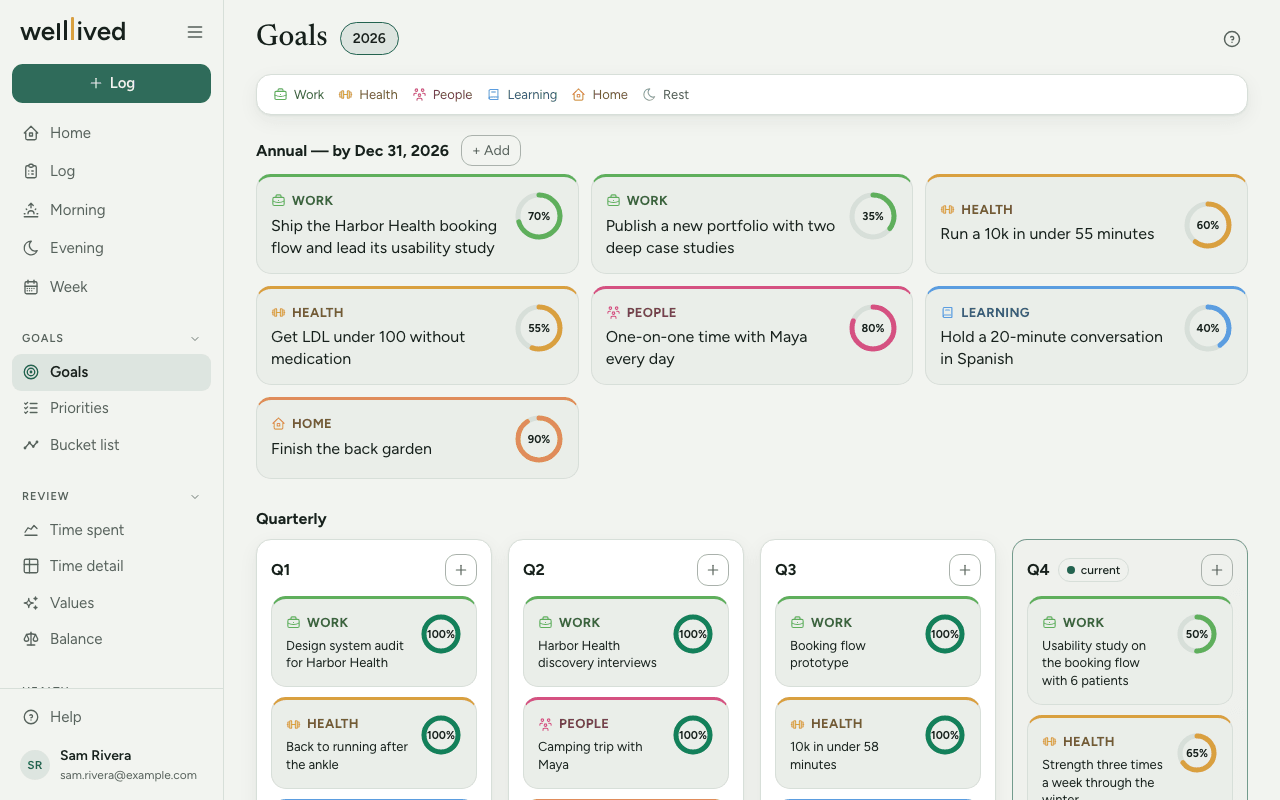
When to use it
Set annual goals at the start of the year (or whenever you start), quarterly goals at the start of each quarter, and come back now and then to move the progress along. Monthly detail lives in Priorities; this page is the longer view.
How to use it
Add a goal
- Open Goals from the menu. The page opens on the current year; the year chips at the top switch to other years you have goals in.
- For a year-long goal, press + Add next to Annual — by Dec 31. For a quarter, press the + in that quarter's box. The current quarter is highlighted and marked current.
- In the editor, choose a Category. The list offers your life areas (and any category you've used on a goal before), and the goal takes that area's colour and icon.
- Write the Goal itself. Something you'd recognise as done or not done at the end of the period works best.
- Optionally fill in How (your approach) and set Progress with the slider.
- Press Save.
Keep it up to date
Click any goal card to open it again. As the period goes on:
- move the Progress slider (in steps of 5%), which fills the ring on the card;
- write what's happened under Progress / results, which shows under the goal on its card;
- at the end of the quarter or year, add an End-of-period summary: what you learned, what you'd do differently.
A goal at 100% shows its ring in the "done" colour.
Remove a goal
Open it, press Delete, then Really delete? to confirm. If you'd rather keep a record, set the progress honestly and say what happened in the summary instead.
Tips
- Start small. One or two annual goals, and one thing per quarter, is plenty for a first year. The empty quarter box asks "What's the one thing for this quarter?" for a reason.
- The colour legend at the top is your life areas from Settings → Life areas. Setting those up first makes the page much easier to scan.
- If a goal's category doesn't pick up an area's colour, add that name under Other names for this area in the life area's settings.
- Write results as you go rather than all at once at the end. A line a month is enough to remember what happened.
- Use Priorities to break a quarterly goal into monthly steps, and Week to pick the next ones.
Questions
What's the difference between Goals, Priorities and the Bucket list? Goals are this year's and this quarter's aims. Priorities are the one or two things per life area you want to move this month. The Bucket list is for experiences you want to have some day, with no deadline.
Can I use my own categories instead of my life areas? Yes. Type any name into Category and it's added to the list. Names that match a life area (or one of its other names) get that area's colour.
What if I leave Category empty? The goal is saved under "General". You can open it later and pick an area.
Does progress update by itself? No. It's your own estimate, set with the slider. Nothing on this page is calculated from your time log.
Related: Priorities, Bucket list, Week, Projects, activities and life areas