
Doctor summary: your health on one page for an appointment
Doctor summary puts a stretch of your sleep, movement, food, weight and labs on one or two printed pages. Each number sits beside its target, so a doctor, coach or nurse can read it in a couple of minutes.
When to use it
The day before an appointment, or when a clinician asks how things have been going. Print it, save it as a PDF to attach to a portal message, or copy it as text.
How to use it
Pick the period
The summary opens on the last 13 weeks, ending yesterday. Today is left out because the day isn't over.
- Click 4 weeks, 13 weeks, 26 weeks or 1 year at the top to change how far back it goes.
- For exact dates, open Filters, set Custom range and click Show. A summary covers a year at most.
- The arrows beside the dates step back or forward by the same length.
Read it
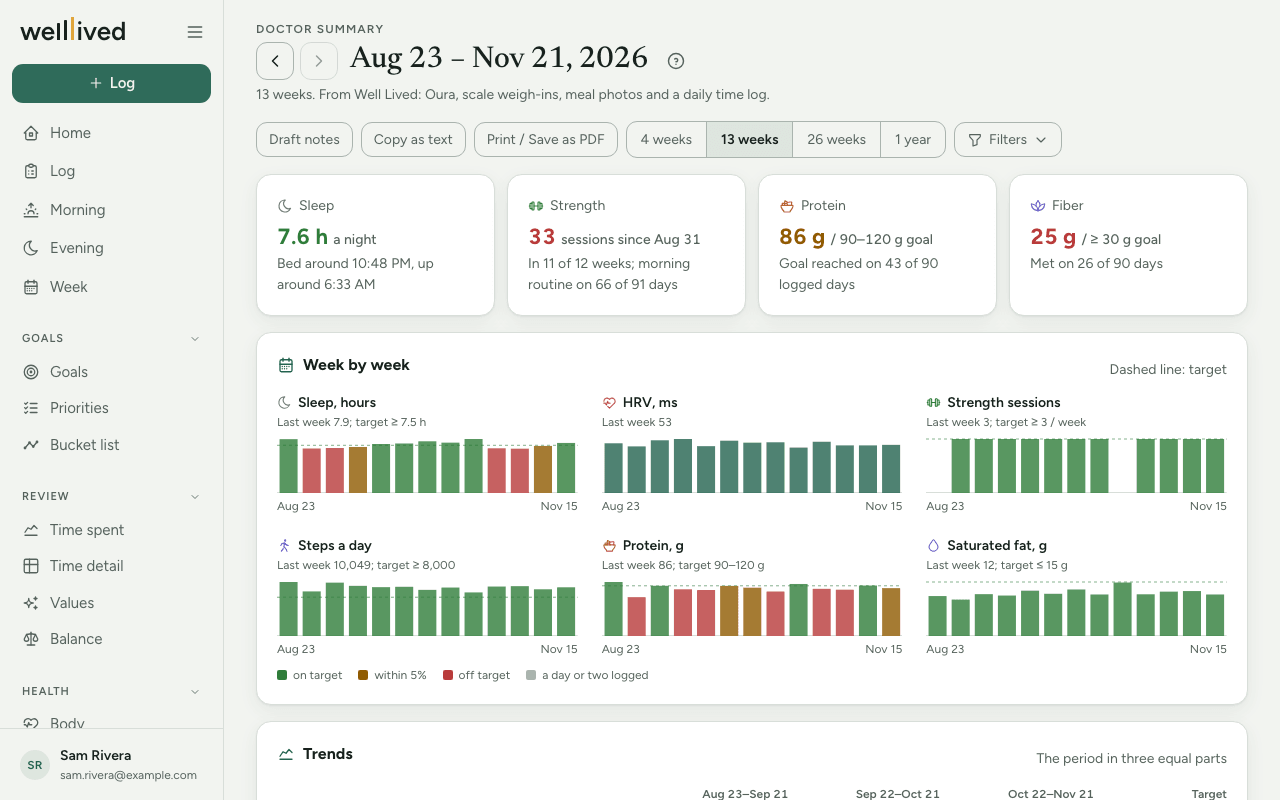
- The cards at the top show the headline numbers, such as sleep, strength sessions, protein, and the food target you're furthest from.
- Week by week has a small chart per measure, one bar for each 7 days, with the target as a dashed line. Green bars are on target, amber bars are within 5%, and red bars are off target. A gray bar means only a day or two was logged that week.
- Trends splits the period into equal parts of about a month, so you can see which way each number is moving: three for 13 weeks, six for 26 weeks, and six two-month parts for a year.
- Strength training lists your sessions, how many weeks had at least one, and the heaviest working sets of your most repeated lifts. A session counts when it has a weighted set, or pull-ups, chin-ups or dips in a workout of 20 minutes or more. Your morning routine doesn't count, even when you log push-ups in it. If you started logging sets partway through the period, strength counts from that week, and the page says "since" that date.
- What I eat counts the days each food appeared in your meal photos, with the less healthy ones listed separately.
- Going well and Worth discussing pick out what is most worth a clinician's time, food and labs first. When a food target and a flagged lab result go together, such as saturated fat and ApoB, they appear on one line.
- Latest labs shows your most recent draw, with anything flagged first.
Each section appears only when you track it. Without a wearable there is no sleep, and without meal photos there is no food section.
Add the assistant's notes
With the AI coach on (a Plus feature), Draft notes asks the assistant for a few lines the numbers can't give:
- a typical day of eating, in What I eat
- the foods behind an off-target limit, such as saturated fat, in Worth discussing
- up to four notes from your time log a doctor would want, such as pain, stress or a missed supplement, with their dates
- a line on what your strength training works
A line at the foot of the summary says which parts the assistant drafted, and Copy as text includes them. Redo notes drafts them again. The assistant reads your meals, workouts, weight, labs, open issues and notes. It never reads your ring's data: no sleep, readiness, heart rate variability or bedtimes.
Share it
- Print / Save as PDF opens your browser's print dialog. Choose Save as PDF to keep a file, or pick a printer. The menu and buttons are left off, so the page prints on white, usually on two Letter pages.
- Copy as text copies the summary as plain text, ready to paste into an email or a patient portal message.
Tips
- Set your targets first, under Targets at the top of Body, Nutrition or Workouts. Every number is judged against them, and a missing target means there's nothing to compare against.
- Food numbers are estimates from your meal photos and only count the days you logged a meal. The note at the bottom says how many days that was.
- If your food log has gaps, Worth discussing says so, so nobody reads too much into a thin month.
- The summary describes your data. It isn't medical advice, and your clinician's view comes first.
Questions
Why does it end yesterday? Today isn't over, so its sleep, steps and meals would make the last week look worse than it was.
Where do the "likely sources" of saturated fat or sugar come from? From each meal photo's own estimate. Only foods that can carry saturated fat or sugar are considered, such as cheese, red meat and desserts for saturated fat, or soda, fruit and sweets for sugar. A food is named when meals with it usually run well above meals without it, and it brings a sizable share of the daily limit. A salad's greens aren't blamed for its cheese, and a food that appears often but adds little, such as a protein bar, isn't named.
Can I send someone a link instead? Not yet. Save it as a PDF or copy it as text, and send that.